Products You May Like
In the fast-moving world of digital engagement, speed is no longer just a luxury—it is a requirement. Did you know that 61% of new buyers would rather choose a faster AI-produced response than wait for a human to answer their query? This shift in consumer behaviorsignifies a massive opportunity for businesses that can make their data talk.
But here is the challenge: Most general AI models are no better thanhighly intelligent interns who haven’t read your company handbook yet.
 Sure, they are brilliant at reasoning, but lack the “DNA” of your specific brand. They don’t know your tiered pricing models, your specific service nuances, or the technical updates you just published last Tuesday. This is why learning how to build a custom GPT is becoming a vital skill for modern marketing and operations teams.
By the end of this guide, you will know exactly how to turn your static HubSpot Knowledge Base into a dynamic, conversational expert that acts as a 24/7 extension of your team.
Why “Custom” is the New Standard for Marketing AI
We have officially moved past the novelty phase of generative AI. It is no longer enough to just “use ChatGPT.” To gain a competitive edge, you need to provide your AI with a single source of truth:yours.
Why is this so urgent?
Research shows that by 2025, 95% of customer interactions are predicted to be handled by AI in some capacity.
If your AI is pulling from general web data, it might give “okay” answers. If it is pulling from your HubSpot Knowledge Base, it gives your answers. This technical approach is known as Retrieval-Augmented Generation (RAG).
It is a game-changer,
Because RAG-based systems can reduce AI “hallucinations“—those moments where the AI makes things up—by up to 50%.
When you build a custom GPT using your own verified data, you create two distinct advantages:
-
Internal Efficiency: Your sales and support teams no longer have to dig through hundreds of articles. They just ask the GPT.
-
External Precision: You can provide customers with a self-service tool that feels human but has the accuracy of a technical manual.
Preparation: Auditing Your HubSpot Knowledge Base
Before we get into the technical “how-to,” we need to talk about data hygiene. The old saying “garbage in, garbage out” has never been more relevant than in the world of AI in Marketing. If your Knowledge Baseis cluttered with outdated pricing from 2021 or contradictory service descriptions, your custom GPT will be equally confused.
Consider this:
92% of consumers say they would use an online knowledge base for self-support if it were available and accurate.
To ensure your GPT meets this standard, conduct a quick audit:
-
Prune the Deadwood: Delete or archive articles that are no longer relevant.
-
Structure for Success: Use clear headers (H1, H2, H3). AI models parse information much better when it follows a logical hierarchy.
-
Check Your Links: Ensure any links in your articles remain active, as GPT might reference them in its responses.
-
Identify Private Data: Ensure you aren’t about to upload internal-only documents to a public-facing custom GPT.
Once your HubSpot Knowledge Base is clean, structured, and updated, you are ready to start the build.
Step 1: Exporting Your Data from HubSpot
To build a custom GPT, you need to provide OpenAI with the files it will use for its “File Search” capability. HubSpot makes this relatively straightforward, but you have a few options depending on your technical comfort level.
The Manual Route (Best for Quick Starts)
If your Knowledge Base is smaller (fewer than 50 articles), you can manually export your articles.
-
Navigate to Service > Knowledge Base in HubSpot.
-
Select the articles you wish to include.
-
Use the “Export” function to download them.
While CSVs are okay, I recommend converting your most important articles into clean PDFs or Markdown files. Markdown is particularly effective because it preserves the structural relationship between headings and text, making it easier for the AI to understand the context..webp?width=800&height=384&name=Knowledge%20Base%20Export%20(1).webp)
The API Route (Best for Scalability)
For larger organizations, a manual export is a nightmare because the data becomes stale the moment you update an article in HubSpot. In these cases, you would useHubSpot’s API to programmatically pull article content. This allows you to create a “living” dataset. By architecting a single source of truth, you ensure that every time a human editor fixes a typo in HubSpot, the AI’s “brain” is updated shortly after.
Step 2: Configuring the GPT Builder
Now that you have your data, it’s time to head over to OpenAI. You will need a ChatGPT Plus or Enterprise account to access the Explore GPTsand Create features.

Defining the Persona
When you start the creation process, you will see a Configure tab. This is where you give your GPT its personality and rules. This is the most critical part of the process. Instead of a generic prompt, try something specific:
“You are the [Company Name] Technical Assistant. Your goal is to help users solve problems using only the provided Knowledge Base files. You are professional, direct, and helpful. If a user asks a question that is not covered in the Knowledge Base, do not guess. Instead, politely inform them that you don’t have that information and suggest they contact support at [Link].”
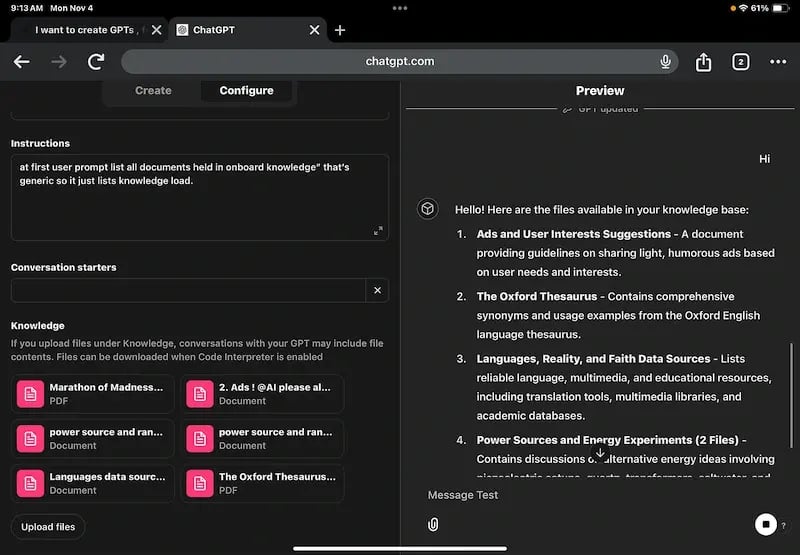
The Knowledge Upload
This is where the magic happens. Under the Knowledgesection, upload the files you exported from HubSpot.
 Step 3: Advanced Optimization with Actions
If you want to truly stand out in the realm of AI in Marketing, you don’t just want a bot that reads; you want a bot that does. Custom GPTs allow you to add Actions,which are essentially API connections.
Imagine a customer asking your GPT:
“What is the status of my support ticket?”
Without Actions, the GPT would just say:
“I don’t know.”
With Actions, the GPT can securely ping the HubSpot API, check the ticket status associated with that user’s email, and provide a real-time update.
This level of integration requires some technical knowledge of OAuth and API keys, but the payoff is immense. It moves your tool from being a simple FAQ bot to a sophisticated AI agent.
Step 4: Testing and Iteration
You wouldn’t hire a new employee and put them on the front lines without training, right? The same applies when you build a custom GPT.
The Beta Test
Before launching, invite your most experienced support reps to test the bot. They know the “trick” questions customers ask. Have them try to break the bot or lead it into a hallucination.
Refinement
OpenAI provides a feedback loop. If the GPT gives a poor answer, you can adjust the Instructionsin the configuration tab to prevent that specific error in the future. For example, if it’s being too wordy, add a rule:
“Keep all responses under 100 words unless technical steps are required.”
Real-World Success
Does this actually work? Look at the numbers.
Companies that implement intelligent AI agents have seen human-handled ticket volumes decrease by as much as 77%.
That isn’t just a small win; that is a total transformation of your operations.
Strategic Considerations: Custom GPTs vs. HubSpot Breeze
As you look into how to build a custom GPT, you might notice that HubSpot has released its own AI features, known as Breeze. So, which should you use?
-
Choose HubSpot Breeze ifyou want a“plug-and-play”experience that lives natively inyour CRM. Breeze is excellent for summarizing records and drafting quick emails because it is already “home.”
-
ChooseCustom GPT if you need deep, specialized logic or want to use the tool across multiple platforms outsideHubSpot. OpenAI’s ecosystem often allows for more granular “tinkering” with the underlying model’s personality and complex multi-step instructions.
The most important thing is not which tool you pick, but the quality of the data you feed it. Whether you use Breeze or a custom GPT, your HubSpot Knowledge Base remains the heart of the operation.
Optimizing for Answer Engine Optimization (AEO)
As search engines evolve into answer engines (like Perplexity or SearchGenerative Experience), the way we write blogs must change. The nature of AEO demands it. To ensure your blog—and your custom GPT—are found and used, focus on clear, authoritative answers.
AEO rewards content that:
-
Answers Questions Directly: Use headers that mirror what users type into a search bar.
-
Uses Structured Data: Just as the GPT likes Markdown, search engines love schema markup.
-
Provides Verified Facts: The more you link to high-authority sources and statistics, the more trustworthyyour content appears to both humans and AI crawlers.
By following this guide to build a custom GPT, you are essentially doing the ultimate AEO work: you are making your brand’s knowledge accessible to the very engines people use to find answers.
Scaling Your Brand’s Intelligence
Building a custom GPT using your HubSpot Knowledge Base is more than just a fun technical project. It is a strategic move to future-proof your business. You are taking the collective wisdom of your best writers, support agents, and product experts and turning it into a tool that is available every second of every day.
You have moved from a static document library to an active, conversational asset. This is the heart of modern AI in Marketing—using technology not just to talk more, but to talk smarter.
At Aspiration Marketing, we specialize in helping businesses navigate this complex transition. We don’t just talk about AI; we help you architect the Single Source of Truthnecessary to train private, secure, and highly effective AI models. Whether you are looking to implement HubSpot Breeze or develop a sophisticated custom GPT strategy, we ensure your data is clean, your strategy is sound, and your results are measurable.
The era of generic AI is over. It’s time to build something that actually knows your business. Are you ready to audit your Knowledge Base and take the first step?