Products You May Like
How do you keep your brand voice consistent when you scale up your content? This is a tough question for marketing directors today. When you have multiple teams, external agencies, and freelancers writing for you, your brand tone can easily get messy.
 Many companies turn to standard Artificial Intelligence (AI) tools to solve this issue. They want to move faster. But standard AI tools often miss the mark. They use generic language, sound robotic, and lack your company’s unique personality.
The good news is that you do not have to settle for generic content. You can build a systemthat knows your business inside and out. By isolating your best legacy content, youcanbuilda custom GPT that works as a secure writing assistant. This assistant will match your brand tone perfectly every single time.
Why Generic AI Tools Hurt Your Brand Identity
Why do public AI models struggle with your specific brand voice? The answer is simple. Standard Large Language Models (LLMs) are trained on public data from across the internet. They know a little bit about everything, but they know nothing about your specific company goals, your customer pain points, or your precise tone.
The Problem with Public Platforms
When you use a generic AI tool, you usually get a generic output. These tools love overused phrases and passive verbs. They create dry text that fails to connect with your target audience. If your company prides itself on being direct and bold, a generic AI tool will likely tone your message down until it sounds like every other corporate blog on the Web.
Beyond the style issue, public platforms present significant data security concerns. If your team inputs unreleased product updates, private customer data, or proprietary strategies into a public AI tool, that data can be absorbed into the public system. This creates a massive compliance risk.
The Real Cost of Bad Data
Data management matters greatly when you adopt new technology.
A report by the IBM Institute for Business Value found that over a quarter of organizations lose morethan$5million annually due to poor data quality, with 7% reporting losses exceeding$25million.
Furthermore, as AI investment scales, the financial cost of poor data quality increases accordingly. So, if you feed bad data or random web text into your workflows, your content will suffer, and your costs will rise.
Building a private B2B AI model solves these problems. It gives your business true data sovereignty. Your private assistant is protected by a secure firewall. It only learns from the materials you approve, ensuring your intellectual property stays safe.
The Value of Brand Consistency
Does brand consistency really change your bottom line? Yes, it does. In a crowded digital market, clarity and predictability build trust. When customers see the exact same message and tone across your website, social media, and sales decks, they feel more confident in your business.
A study published in the Marq Brand Consistency Report reveals that maintaining strict brand consistency across all digital channels can increase organizational revenue by 10% to 20%.
When you build a custom GPT, you protect that revenue. You create a tool that locks in your brand identity, so it never shifts, no matter who creates content.
Step 1: The Content Audit—Isolating Your Core Assets
How do you start building your custom tool? You begin with a thorough content audit. When you build a custom GPT, the AI learnsfrom what you give it. If you feed it mediocre content, it will produce mediocre content. This step requires you to isolate your high-performing legacy content assets.
How to Select Your Training Material
You do not need to upload every single document your company has ever created. In fact, doing so will confuse the AI model. Instead, look for your highest-converting pieces. Find the blog posts that bring in the most organic traffic. Pull out the whitepapers that generate your best leads, and grab the case studies that your sales team loves to share.
-
Filter your assets: Focus on the top 10% of your top-performing marketing collateral.
-
Remove old files:delete outdated pricing lists, product feature sheets, and messaging guides.
-
Include your style guide: Add your primary brand book, list of target keywords, and tone definitions.
How to Organize Your Files
Once you have collected your best assets, you need to make them easy for the machine to read. Clear text files or well-structured PDFs work best. Clean up your documents by removing weird formatting, broken code, and unnecessary images.
To optimize your text for AI engines, use clear, well-structured sentences built on semantic triples. A semantic triple is a simple data structure that breaks a statement down into three basic parts: a subject, a predicate, and an object (for example, “Our software [subject] automates [predicate] invoicing [object]”).
Writing in this direct format helps the Large Language Model quickly grasp the exact relationships between your core concepts without getting lost in complex grammar. Grouping your cleaned files into clear categories, such as educational top-of-funnel content or product-focused bottom-of-funnel content, gives your new assistant a pristine, easy-to-read digital library.

Step 2: Setting the Rules and System Instructions
What makes an AI writing assistant behave correctly? It all comes down to the system instructions. This is where you tell the AI exactly who it is, what it does, and what it must avoid. Do not use vague prompts like “write in a professional tone.” Instead, use clear, direct instructions.
For example:
Good Prompt Architecture1. Define the Persona (e.g., Senior Enterprise Tech Copywriter) 2. Establish Negative Constraints (e.g., Never use clichés like “in today’s digital landscape”) 3. Set Retrieval Rules (e.g., Only use facts from the uploaded documents) |
Build Clear Guardrails
Your system instructions should outline your stylistic boundaries. Tell your custom GPT to use the active voice. Instruct it to keep sentences short and clear. Give your team a list of banned words or phrases that make them cringe.
You must also set up clear retrieval rules. Instruct the model to prioritize the documents you uploaded over its general knowledge. Tell it that if an answer cannot be found in your corporate files, it must say “I do not have this information.” This simple rule keeps the AI from hallucinating or making up facts.
Keep Humans in the Loop
Even with great instructions, you should never put your content on complete autopilot. The best marketing teams combine great tech with skilled human editors.
According to data from the Content Marketing Institute B2B Insights, 72% of the most successful content marketing teams use a structured, human-led verification process when they work with AI tools.
Your custom GPT is a powerful co-pilot, but a human expert should always review the final text before it goes live.
Step 3: Connecting Your System to Enterprise Workflows
How does your custom GPT move from a simple chatbot to a true business engine? You do this by connecting it to your existing enterprise workflows and data systems.
Use Advanced Actions and APIs
When you build a custom GPT, you can use “Actions.” These actions connect the AI to other software platforms via APIs. This means your writing assistant can pull real-time data from your customer relationship management (CRM) platform, your product database, or your internal knowledge base. If you’re on HubSpot, for example, you can rely on the HubSpot ContentAgent to pull information from your Knowledge base and CRM for accurate, real-time data.
Imagine you want to draft an email campaign for a specific customer group. Instead of copying and pasting information back and forth, your custom GPT can connect to your secure internal systems, pull the latest product specifications, and write the email copy using your verified brand voice.
Maintain Clean Data Systems
To make these automated workflows work well, your internal data systems must stay clean and organized. If your internal knowledge bases are messy, your custom tool will struggle to find the right answers. Keeping your internal records up to date ensures your AI assistant can always find the correct facts instantly.
What is AI Search Optimization (AEO)?
As you explore AI in Content Marketing, you need to understand how the internet is changing. People are moving away from traditional search engine result pages. Instead, they are using AI search engines and conversational bots to get quick answers to their questions. This shift is why you need Answer Engine Optimization (AEO), and why you should focus on writing content for LLMs.
How to Format Content for AI Search
AI search engines look for clear, direct answers to specific user questions. To make sure your company’s public content gets picked up by these engines, you should apply a few simple formatting habits:
-
Answer questions immediately: Put a direct answer right below your subheadings.
-
Use simple tables: Organize data and comparisons into clean tables that AI systems can read instantly.
-
Write clear bullet points: Break down complex processes into simple, ordered lists.
-
Stick to active voice: Simple sentences are much easier for AI search algorithms to crawl and summarize.
When you build your own custom GPT, you can program these AEO rules directly into its core instructions. This means every piece of draft content your assistant creates will be built for modern AI search systems from the start.
Best Practices for Managing Your AI Writing Assistant
To get the most out of your investment, you need a plan for regular maintenance. An enterprise AI model is not something you set up once and forget about. It needs regular care to stay useful.
Conduct Quarterly Reviews
Your business evolves over time. You launch new products, update your messaging, and enter new markets. Every quarter, review the files you uploaded to your custom GPT. Remove anything that is out of date and add your latest high-performing content assets.
Track Your Team’s Usage
Talk to your writers, editors, and content creators regularly. Ask them how the custom GPT is performing. Are there specific phrases it uses too often? Is it struggling with certain types of content? Use this feedback to refine your system instructions.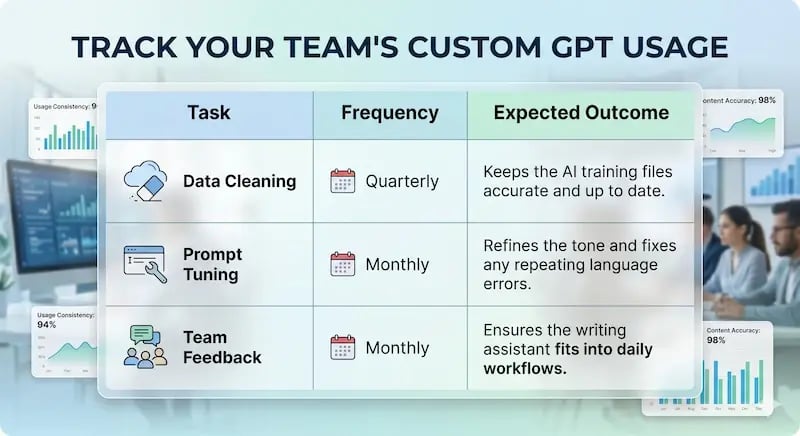 Summary of the Creation Process
Building a unique writing tool takes focus, but the steps are straightforward. For simplicity’s sake, we’ve created a quick checklist summary of the process:
[ ] Audit your content: Gather the top 10% of your high-converting marketing assets.[ ] Clean your files: Remove messy formatting and outdated information from your documents.[ ] Write strict instructions: Define your brand persona and set up clear rules for what the AI can and cannot do.[ ] Connect your software: Use secure enterprise APIs to link your AI assistant to your internal databases.[ ] Review your results: Keep a Human-in-the-Loop to edit the text and verify its accuracy.
Take Control of Your Digital Future
Building a private writing assistant helps you protect your brand identity while scaling up your production. It stops you from relying on generic public models that make your business look ordinary. It keeps your proprietary data safe behind a secure wall, and it gives you total control over your corporate voice.
When you use your own high-performing content assets to train a private system, you turn your brand’s historical success into a repeatable process. Your team can create consistent, high-quality content much faster, free from the worry of stylistic drift or data leaks.
Are you ready to audit your company files and build your own private enterprise AI model? We can help you navigate this journey. At Aspiration Marketing, we help businesses build strong data foundations, set up secure AI frameworks, and connect automated content workflows to strict brand guidelines.
Contact Aspiration Marketing today to learn how we can help you turn your top marketing assets into a secure, custom AI engine.