Products You May Like
Are your sales, marketing, and support teams running isolated AI experiments that do not talk to each other? What happens when a sales prospecting bot reaches out to a key account, completely unaware that the customer opened an urgent support ticket two hours ago?
When AI tools operate in silos, they create fragmented customer experiences and add friction to your revenue operations.
 Modern buyers expect seamless, personalized interactions across every touchpoint. To deliver that level of experience, Revenue Operations (RevOps) teams need centralized AI orchestration. Enter HubSpot Agent Hub and Agent Builder.
HubSpot built Agent Hub to give teams a single workspace for deploying, monitoring, and customizing autonomous AI agents powered by real-time CRM data. In this guide, we break down what HubSpot Agent Hub is, how it works with Agent Builder, a step-by-step walkthrough of the interface, and practical RevOps use cases you can implement today.
What Is HubSpot Agent Hub and Where Does It Fit in RevOps?
HubSpot Agent Hub is a unified command center inside the HubSpot platform. It lets teams manage autonomous AI agents across marketing, sales, service, and operations. Instead of treating AI as a stand-alone chatbot on a single webpage, Agent Hub ties agentic workflows directly into your core customer database.
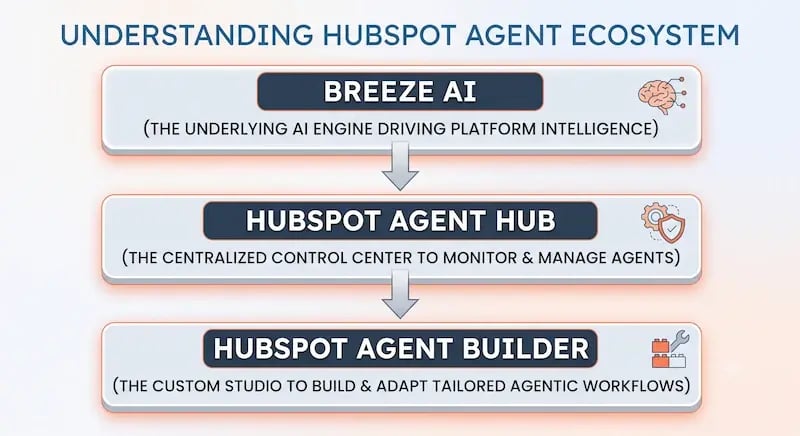
To understand its role in your RevOps tech stack, it helps to distinguish three connected components:
-
Breeze AI: The underlying intelligence engine driving AI actions across the HubSpot platform.
-
Agent Hub: The centralized management workspace where you view agent performance, track health metrics, and govern behavior across teams.
-
Agent Builder: The creation studio inside Agent Hub, where you customize pre-built agents or design tailored agents using natural language prompts and CRM guardrails.
Why Shared CRM Context Matters for RevOps
Traditional chatbots rely on static scripts and limited session memory. Once a user leaves a chat window, context vanishes.
HubSpot Agent Hub changes this by using a shared CRM context. Agents access live contact records, deal stages, support ticket logs, and call transcripts.
When a prospect interacts with a prospecting agent, that activity logs directly to their contact record. If that prospect later submits a support ticket or schedules a discovery call, the next agent reads the exact same history. Shared memory prevents repeated questions and creates a smooth buyer journey.
AI adoption in revenue organizations is accelerating fast.
According to Gartner, 75% of B2B sales organizations will augment traditional sales playbooks with AI-guided selling solutions by 2025.
Furthermore, research from McKinsey & Company shows that,
Companies using AI in sales and marketing increase leads and appointments by over 50% while cutting costs by 40% to 60%.
Centralizing these capabilities inside your CRM ensures those cost savings and pipeline gains do not come at the expense of data quality or brand consistency.
Technical Walkthrough: Navigating Agent Hub and Agent Builder
Setting up and managing AI agents requires clear governance and proper configuration. Here is a step-by-step walkthrough to help you navigate Agent Hub and Agent Builder with confidence.

Step 1: Check System Requirements and Governance
Before launching agents, verify your account permissions and AI settings:
-
Log in to HubSpot as a Super Admin.
-
Navigate to Settings (the gear icon in the top navigation bar).
-
In the left sidebar, select AI.
-
Enable access toggles for your data sources, including CRM Data, Conversation Data, and Files Data. These toggles allow agents to read customer records securely.
-
Review user permission sets to dictate which team members can build, edit, or publish agents.
Note: Agent Hub access varies by plan. Professional and Enterprise tiers include advanced agent configuration, while specific pre-built agents may require assigned service or sales seats.
Step 2: Access the Agent Hub Workspace
Once permissions are active, access your central control center:
-
Click on Agents in the primary HubSpot navigation bar.
-
Select Agent Hub.
-
Review your main dashboard. Here, you will see summary cards for all active, paused, or drafting agents in your portal.
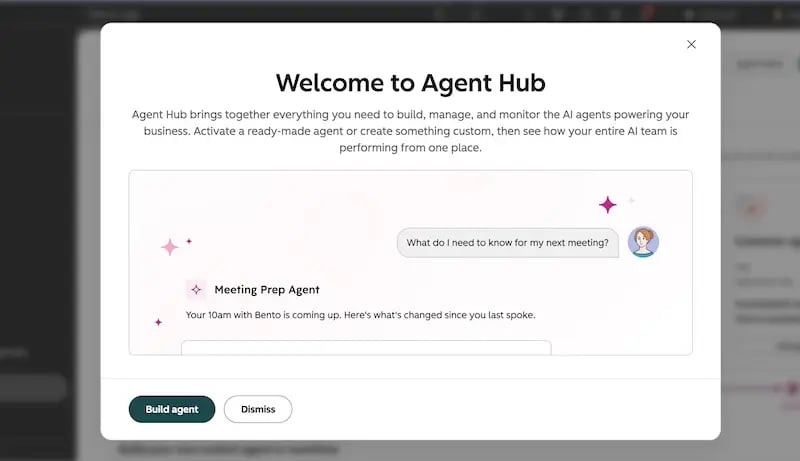
The dashboard displays real-time performance indicators, including execution volume, success rates, escalation frequency, and active conversations.
Step 3: Explore and Install Pre-Built Agents
If you prefer not to start from scratch, use pre-configured tools:
-
Inside Agent Hub, click Agent Marketplace in the top-right corner.
-
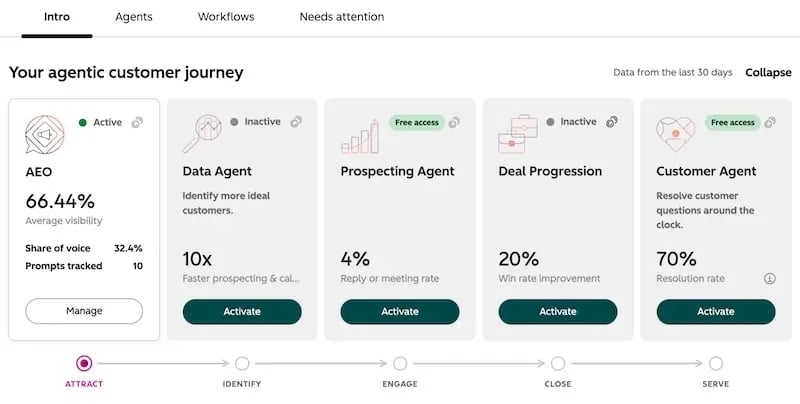
Browse pre-built solutions such as the Prospecting Agent, Customer Agent, or Data Agent.
-
Select an agent to view its default skills and requirements.
-
Click Install Agent to add it directly to your Agent Hub workspace.
Step 4: Build Custom Workflows in Agent Builder
When pre-built tools need custom adjustments, use Agent Builder:
-
In Agent Hub, click Create Agent.
-
Select Start from Scratch or pick a template base.
-
Name your agent and define its primary role using natural language prompts (e.g., “You are a lead qualification agent for enterprise software accounts”).
-
Define allowed CRM objects under the Context & Knowledge tab. Choose whether the agent can read contacts, deals, tickets, or knowledge base articles.
-
Configure Triggers & Actions. Specify what starts the agent (such as a form submission or record property change) and what actions it can execute (such as sending an email or updating a field).
-
Establish Human-in-the-Loop Safeguards. Set approval rules so high-stakes emails or deal state changes require human review before firing.
-
Test the agent in the sandbox preview pane, then click Publish.
Solving Real Customer and Operational Problems: Use Cases
Deploying HubSpot Agent Hub is not just about technology—it is about solving everyday business challenges. Here are three core RevOps areas where agentic workflows deliver immediate impact.
|
Strategic Pillar |
Core Operational Challenge |
Agent Hub Solution |
Real-World Impact |
|
1. Stronger Customer Conversations |
Handoffs between sales and support create lost context and frustrated buyers. |
Prospecting and Customer Agents share full interaction histories across touchpoints. |
Faster resolution times and consistent messaging throughout the sales cycle. |
|
2. Smarter Solution Design |
Incomplete CRM fields and outdated records corrupt reporting and skew pipelines. |
Data Agents audit records, fill missing properties, and flag duplicate files automatically. |
Clean pipeline data, accurate forecasting, and lower manual admin load for reps. |
|
3. New Services Opportunities |
Reps miss upsell or renewal signals buried in large volumes of usage data. |
Custom Agents continuously track usage trends, ticket escalations, and deal health scores. |
Timely alerts for account managers to target proactive cross-sell outreach. |
1. Creating Stronger Customer Conversations
Imagine a prospect researching your product late at night. They ask the Customer Agent detailed questions about API rate limits and enterprise pricing. The agent answers using your knowledge base and records the interaction on the prospect’s contact timeline.
Two days later, the prospect books a discovery call. The Prospecting Agent generates an account preparation brief for your account executive.
Instead of asking basic questions, the rep starts the call by addressing the exact technical requirements discussed with the agent. The conversation moves forward faster, building trust immediately.
2. Smarter Solution Design and Data Hygiene
Messy CRM data degrades performance across marketing, sales, and operations.
According to research from Gartner,
Poor data quality costs organizations an average of $12.9 million annually.
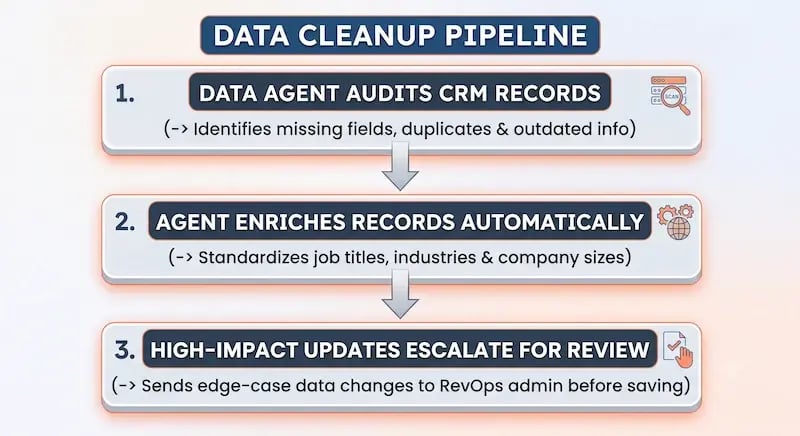 Using a Data Agent inside Agent Hub automates routine database maintenance:
-
The Data Agent audits incoming contact records for missing job titles, industry tags, or company sizes.
-
It enriches profiles using verified database sources and standardizes text formats across custom properties.
-
If the agent detects potential duplicate records, it flags them for RevOps review rather than overwriting valuable deal notes.
This automated cleanup reduces manual admin work for sales reps, giving them more time to focus on active deals.
3. Unlocking New Services and Expansion Opportunities
Retention and expansion drive profitable SaaS growth. However, account managers often struggle to track account activity across hundreds of customers.
Custom agents inside Agent Hub monitor account health metrics continuously:
-
An agent scans product usage logs, ticket volumes, and NPS responses.
-
When a high-value account approaches its usage limit or logs positive survey feedback, the agent triggers an alert in the account manager’s task queue.
-
The agent drafts a tailored expansion proposal based on the account’s actual feature usage, ready for the account manager to review and send.
Proactive account tracking transforms reactive renewal calls into structured expansion conversations.
Best Practices for Scaling Agentic Workflows Responsibly
Autonomous agents offer high speed and scalability, but they require proper guardrails. Follow these best practices to maintain control and ensure quality across your workflows:
Define Narrow, Specific Scopes
Do not ask an agent to “manage inbound leads.” That prompt is too broad and leads to unpredictable results.
Instead, narrow the task:
“Review inbound form submissions for companies with over 100 employees, enrich the industry property, and draft a personalized meeting request for the assigned rep.”
Specific boundaries produce consistent results.
Clean Your Data Foundation First
AI agents mirror the quality of the data they read. If your knowledge base articles contain outdated product specifications, your agents will quote inaccurate information to customers. Audit your knowledge base, CRM properties, and call transcripts before pointing agents to them.
Use a Phased Rollout Model
Start new agents in a Read and Draft mode. Allow the agent to gather context and draft responses, but require human team members to approve messages before they go to customers.
Once your team verifies accuracy over several hundred executions, grant full autonomy for low-risk tasks while keeping approval steps for critical workflows.
Getting Started with HubSpot Agent Hub
HubSpot Agent Hub gives RevOps teams a powerful platform to manage AI agents across the entire customer lifecycle. By combining centralized oversight in Agent Hub with tailored workflows built in Agent Builder, you remove data silos, maintain clean database records, and deliver faster, more personalized customer interactions.
Building an AI strategy requires aligning your tools, team processes, and data architecture.
At Aspiration Marketing, we help growing companies design, implement, and optimize modern RevOps strategies. Whether you want to audit your existing CRM data foundation, configure custom Breeze AI agents, or streamline cross-departmental workflows, our team brings hands-on expertise to accelerate your results.
Ready to transform your RevOps engine with strategic AI automation? Reach out to Aspiration Marketing today to schedule your RevOps alignment assessment.