Products You May Like
Are your highly paid engineers and product managers still spending hours hunting down outdated technical specifications across hundreds of scattered subdirectories? Why does a single engineering update require your marketing team to manually open, edit, and republish dozens of static web pages or PDF manuals?
 In an enterpriseenvironment, products evolve rapidly. Software APIs push continuous updates, hardware configurations undergo micro-revisions, and compliance standards shift overnight. Yet, the traditional systems used to manage technical product documentation remain fundamentally slow, fragile, and siloed. When documentation falls behind product development, businesses face massive content debt, spiked customer service costs, and lost user trust.
According to data compiled by Gartner, shifting away from clunky legacy interactions to low-effort, high-clarity digital experiences can reduce corporate customer service costs by up to 30%.
Clear, accurate, and instantly accessible product information forms the foundation of that effortless digital experience.
To solve the content scaling crisis, forward-thinking enterprises are shifting away from disconnected Content Management Systems (CMS) and embracing an Answer Engine Optimization (AEO) approach. By automating technical product documentation through a unified, AI-driven platform like HubSpot Content Hub, you turn static text into an agile asset. Let us look at how you can transform your technical content pipeline into a dynamic, highly accurate ecosystem.
The Technical Content Dilemma: Scale vs. Accuracy
How many live pages on your corporate website currently feature deep technical specifications, assembly diagrams, API keys, or troubleshooting workflows? For most enterprises, that number easily reaches into the hundreds or thousands. This massive footprint leads to a pervasive corporate challenge known as content sprawl.
When your product team modifies an engineering variable, that change must be reflected in every manual, guide, and data table across your digital ecosystem. When updates happen manually, mistakes are inevitable. A busy writer might miss a page, or an outdated PDF might remain indexed on a hidden subdirectory. This disconnect causes significant friction for both your internal teams and your external customers:
-
Engineering Drain: Engineers waste precious development hours reviewing marketing copy, cross-checking technical tables, and correcting formatting errors.
-
Accuracy Degradation: Technical writers, acting like ghostwriters for engineering data, risk losing technical precision when translating complex code or formulas into static web layouts.
-
Search Engine Disconnect: Traditional content configurations isolate data inside deep layouts or locked files. Modern search models cannot easily parse this hidden data, rendering it invisible to users seeking quick solutions.
This administrative overhead carries a heavy price tag.
A study by McKinsey & Company highlights that the average knowledge worker spends up to 20% of their workweek simply searching for internal data or hunting down accurate information.
If your team spends a fifth of its time verifying what is true, your content pipeline is broken. What you need is an AI technical research assistant to handle it.
Legacy CMS architecture treats text as independent page blocks. This means a table of voltage limits on a product page has no relationship to the exact same table inside a troubleshooting guide. By separating your core data from its display, you make manual updates increasingly difficult to maintain as your business grows.
Architectural Foundation: HubSpot Content Hub Enterprise for Technical Assets
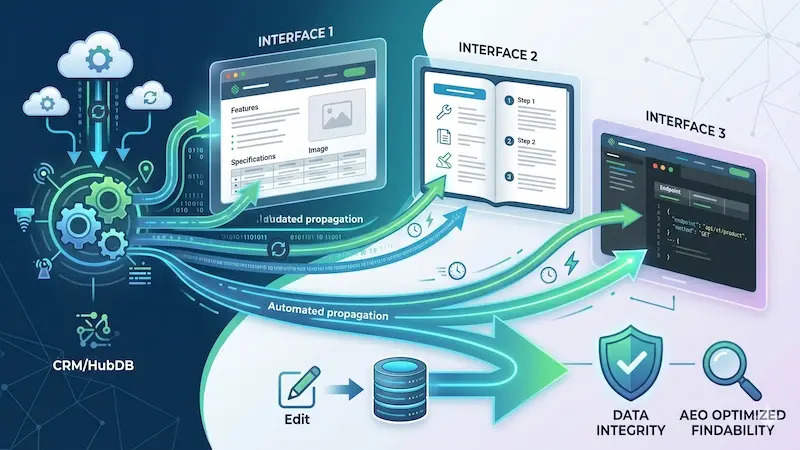
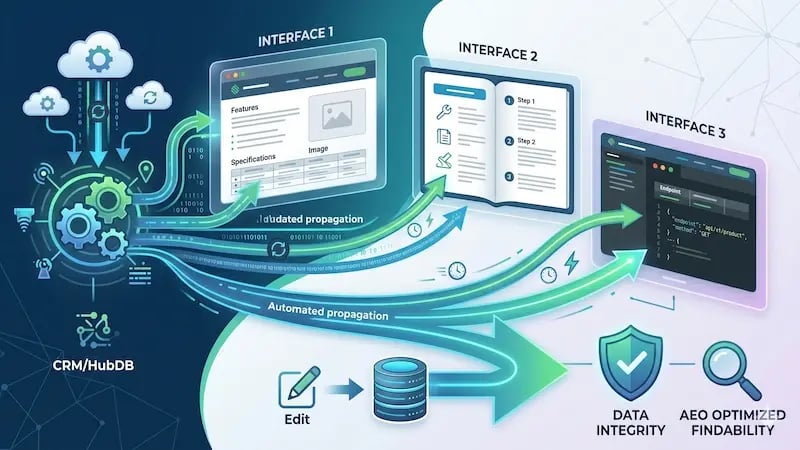
To eliminate manual updates, you need to change how your website treats data. HubSpot Content Hub Enterprise offers a solution by shifting your web content away from isolated text blocks and tying it directly into an intelligent Smart CRM. This setup lets you treat your website like an engineer would treat a software database.
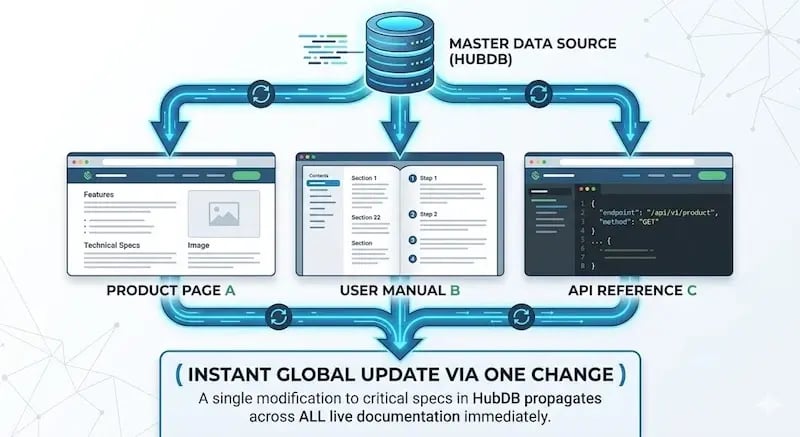
The primary tool driving this flexible ecosystem is HubDB, a relational database built directly into the HubSpot CMS. Instead of typing the same technical specifications onto twenty different product pages, you store those specifications as organized data rows inside a centralized HubDB table.
How Dynamic Content Models Work
Imagine your enterprise manufactures industrial water pumps. You have a single HubDB table where each row represents a unique pump model, and the columns contain specific attributes. For example:
Attributes = Flow Rate / Maximum Pressure / Power Consumption / Current Firmware Version.
Using HubSpot’s dynamic page templates, you can build a single master layout file. When a customer visits a specific product URL, HubSpot instantly pulls the exact matching row from your database to generate the page.
If your engineering team increases the maximum pressure rating for a pump model, you only need to update a single field in your HubDB table. Instantly, every product sheet, landing page, and comparison guide across your entire live website updates at the exact same moment.
Advanced Governance and Controls
When you open up website data to automate processes, maintaining strong control over changes is absolutely critical. HubSpot Content Hub Enterprise includes strong governance tools built for complex operations:
-
Custom Objects: Define exact data models that match your real-world products. You can tie documentation pages directly to hardware serial numbers, software subscription levels, or regional compliance groups.
-
Advanced Content Permissions: Ensure that only authorized personnel can change technical details. You can configure workflows in which an editor drafts content, but updates cannot go live until an engineering manager clicks approve.
-
Comprehensive Revision History: Easily track every change across your data tables. If an error slips into a specification table, your team can roll back to the previous verified version in a single click.
By turning your content management into a structured data system, you lay the foundation for the safe and effective use of AI tools.

The Tactical Roadmap: Automating Global Technical Updates Instantly
Moving from static, manual document management to an automated, intelligent ecosystem requires a clear, structured implementation plan. This tactical roadmap will help you integrate data systems and AI tools smoothly.
Step 1: Audit and Centralize Your Content Architecture
Begin by analyzing your current website toidentify alltechnical information. Map out where your product specifications, safety notices, and installation guides currently live. Identify the repeating data points that cause the most frustration when they change.
Once you have mapped this layout, design your HubDB tables or custom object fields. Group your text into logical modules so that a change to a single master row updates all connected guides, comparison layouts, and user portals simultaneously.
Step 2: Deploy Intelligent AI Assistants
With your data architecture set up, you can use HubSpot’s Breeze AI tools to handle heavy lifting. Instead of forcing human writers to manually retype legacy PDF manuals into your new database, you can use AI assistants to read, sort, and organize old content.
These AI tools can quickly scan raw engineering text, clean up messy code snippets, and flag missing information. This keeps your production moving fast and allows your technical experts to focus on verifying accuracy rather than copying and pasting text.
Step 3: Optimize for Technical Readability and Answer Engines
Modern search behavior has changed. Users no longer want to browse through a massive 200-page document to find a single setting. They type highly specific questions into search bars or ask AI chatbots for immediate answers. This shift is why you need to optimize your content for Answer Engine Optimization (AEO).
To ensure search engines and AI models can easily read and pull answers from your text, use a highly structured layout:
-
Lead with Direct Answers: Start every technical sectionwithaclear, direct answer to the user’s primary question.
-
Keep Paragraphs Concise: Limit your paragraphs to two or three sentences to make them easy to read.
-
Use Clear Headings: Break up sections with logical H2 and H3 tags that state the exact topic.
-
Incorporate Semantic Data Tables: Organize specifications into standard Markdown tables. Clean code tables are highly visible to search engine crawlers and AI answer models.
This clear, tabular approach makes your technical data easy for both human readers and search algorithms to understand.
Step 4: Scale and Automate Your Global Translations
For global enterprises, updating documentation becomes twice as hard for every new language you support. HubSpot Content Hub streamlines this process by combining automated AI translations with your primary content workflows.
When you update a technical specification in your main language, HubSpot can automatically generate translated versions using advanced AI engines. To keep your content reliable, you can route these automated drafts directly to local engineers for a quick final check before publication. This workflow lets you maintain accurate, multilingual support across dozens of regions without slowing down your product releases.
Quantifiable Outcomes: Measuring the ROI of Automated Documentation
Investing in automated content systems delivers clear, measurable returns for both your operations and your marketing performance. Moving away from manual updates eliminates hidden business costs and provides major advantages you can track over time:
Major Time Savings
By replacing manual page updates with automated data tables, you cut down the time required to launch critical product documentation updates from weeks to seconds. Your engineering and marketing teams can step away from tedious site maintenance and focus on building products and growing your pipeline.
Lower Customer Support Costs
When your online guides and manuals are always accurate and easy to find, customers do not need to call or open a help ticket to solve simple problems. They find the exact answers they need on your website, reducing strain on your support teams and improving customer satisfaction.
Higher Visibility in Search and AI Answers
Clean, well-structured web content naturally ranks better on modern search engines. By organizing your documentation into clear, machine-readable layouts, you optimize your site for zero-click searches and AI response engines.
According to data from the HubSpot State of Marketing Report, updating SEO for structural and algorithmic changes is a top-five trend for 40.6% of brands, with over 92% of marketers now optimizing content specifically for traditional and AI-powered search engines.
Furthermore, as AI saturation takes hold,
69.2% of high-performing marketing leaders note that they are successfully leveraging customer data structures to build personalized, highly visible digital experiences.
The data speaks for itself: 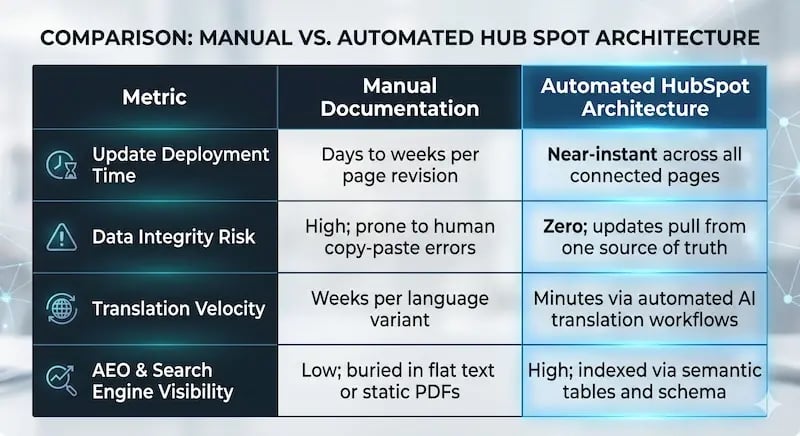 Conclusion
Enterprise technical documentation does not have to be a slow administrative bottleneck that drains your team’s energy and risks user trust. By organizing your core product specifications inside HubSpot Content Hub Enterprise and using intelligent AI tools, you can automate your content updates, protect your data accuracy, and scale your global translation efforts with ease.
Taking your documentation from scattered, static files to an automated system requires strategic planning, solid data design, and deep platform experience. This is where Aspiration Marketing can help. As an elite HubSpot partner, Aspiration Marketing specializes in designing the custom object schemas, HubDB architectures, and technical content plans needed to modernize complex digital platforms.
Contact Aspiration Marketing today to transform your technical product documentation into an automated, highly discoverable engine that drives growth and improves the user experience.