
Products You May Like
Are your support representatives spending more time answering the same repeated questions than resolving critical, nuanced customer issues? It is a common dilemma for growing service teams. As ticket volumes scale, human teams frequently find themselves trapped in a cycle of reactive problem-solving. They answer the same foundational questions about software settings, return windows, or account configurations over and over.
 Traditional self-service portals were supposed to fix this problem, but they require constant maintenance. Human-managed documentation setups struggle to keep pace with rapid software updates, changing product catalogs,and shifting customer behavior. This reality creates a distinct support gap. When documentation stalls, ticket queues swell.
However, a shift is occurring in how organizations scale customer support.Modern HubSpot customer agentsdo not merely read from anexisting knowledge base to answer customer questions. It actively builds, optimizes, and updates that database on its own. By identifying unresolved service tickets and tracking unfulfilled inquiries, this tool transforms from a conversational chatbot into an automated content development engine.
The Machine Feedback Loop: How the Agent Listens, Learns, and Analyzes
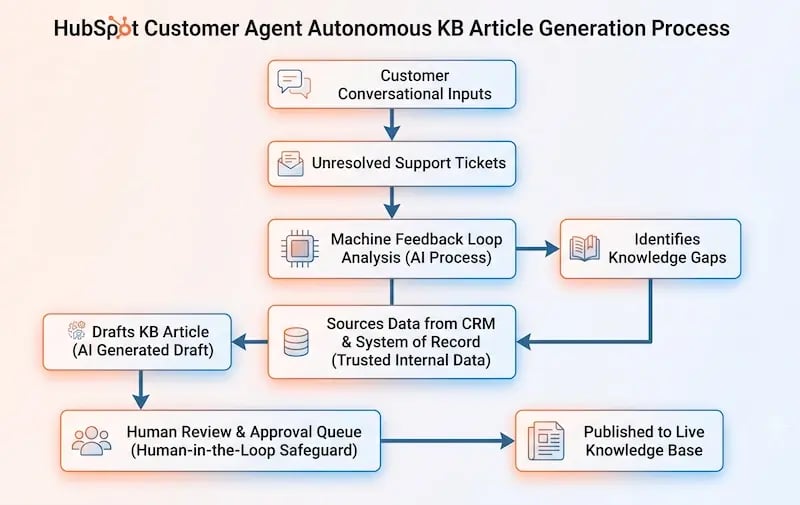
To understand how this technology shifts your support architecture from reactive to proactive, you must examine the machine feedback loop. Traditional customer support setups view a closed ticket as the end of a transaction. The HubSpot customer agents, operating within a unified CRM infrastructure, view unresolved or escalated conversations as essential data sources.
Identifying the Unanswered
When a customer interacts with your support channels and introduces an entirely new query—or phrases a problem in a way that existing help documents cannot address—the agent notes the interaction. If the agent cannot find a high-confidence answer within its current resources, it handles the initial conversation safely by routing the user to a human representative.
Crucially, the interaction does not stop there. The system flags this conversation inside the CRM platform as a distinct “Knowledge Gap.” It isolates the exact keywords, phrases, and intent patterns that triggered the human handoff, ensuring that structural data omissions are automatically tracked.
Aggregating Conversational Data
An isolated customer service issue might be an anomaly. However, when hundreds of customers simultaneously struggle with a specific process, it signals a systemic operational issue. The agent monitors these trends continuously over days and weeks.
Instead of waiting for a support manager to manually audit transcripts and figure out why ticket volume is rising, the systemautomatically aggregates recurring data points. It isolates identical topics and categorizes them by volume and urgency. This operational approach provides an immediate answer to a foundational question: “What do our users need to know right now that we have failed to tell them?”
Mapping the Scaling Challenge
Consider a real-world scenario. A software-as-a-service (SaaS) enterprise launches a major update to its billing interface. Suddenly, the help desk faces an unexpected surge of tier-one support tickets from long-term users seeking their payment history.
Instead of forcing your human team member to copy and paste identical instructions for weeks, the agent catches this trend instantly. It tracks the volume spike, recognizes the core subject matter, and initiates a draft workflow to address the problem.
This type of speed is why recent marketplace metrics indicate that,
The HubSpot Customer Agent has reached a 70% autonomous resolution rate for support conversations, climbing significantly within a single year.
The Blueprint of Autonomous Content Generation
Once the system identifies a clear information deficit, it switches from data analysis to content creation. This phase is where true AI in customer service shifts from simple automated text expansion to deep contextual generation. The system actively drafts technical help articles designed to resolve the identified problem.
 Sourcing Content Safely
To draft an accurate article, the agent cannot pull text from random public search indexes. It relies strictly on your internal system of record. The agent reviews historical support tickets that human representatives solved successfully.
It parses internal product descriptions, reviews chat histories, and looks at verified resolution steps tucked inside your CRM history. By grounding the generation process in actual corporate history, the system drafts content that reflects true technical answers.

Deploying technology like this requires an exceptional foundational dataset.
According to Gartner’s 2025 AI Implementation Survey, 62% of underperforming AI support projects fail due to insufficient data preparationrather than failures in the core technology itself
This statistic underlines the absolute importance of managing your internal information assets correctly before attempting broad automation.
Structuring Text for Readability and Search Engines
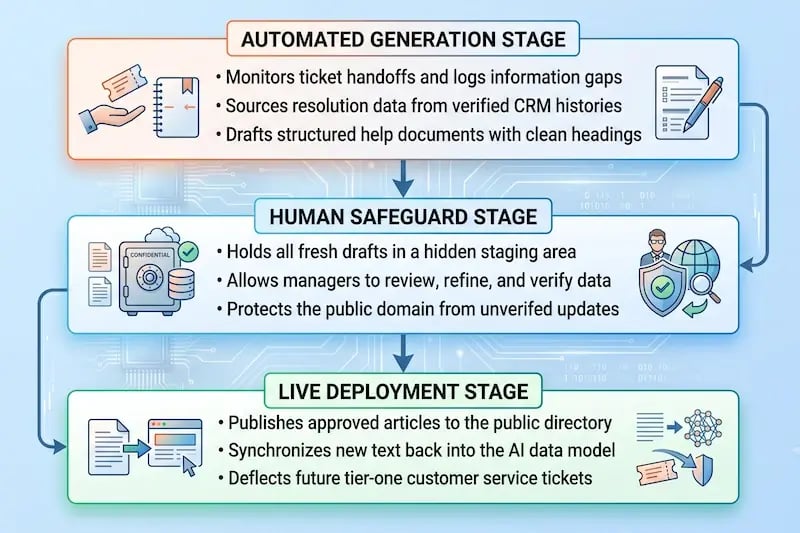
Writing clear, helpful content requires a specific structure. The agent designs every new draft to align with standard web formatting practices. It generates short paragraphs, includes distinct headings, and converts complex technical steps into clear bulleted lists.
This clean structure serves a dual purpose. First, it makes the document easy for a human user to scan and understand. Second, it optimizes the content for Answer Engine Optimization (AEO). Modern AI answer engines require clear, structured answers to surface content effectively. By structuring articles with precise headings and definitive data points, your help documents are prepared to rank well on both traditional search networks and modern AI discovery engines.
Overcoming Linguistic Variance
Human beings describe problems using different words. One customer might submit a ticket about changing an “invoice details layout,” while another asks how to alter “billing address lines.”
The agent effortlessly addresses these semantic variations. When drafting a document, it includes relevant conceptual synonyms, context tags, and alternative phrasing based on actual user chat logs. This practice ensures that no matter how an individual phrases their search query in the future, the automated system can locate and deliver the correct help document immediately.
The Human-in-the-Loop Safeguard: Maintaining Brand Trust
Allowing artificial intelligence to analyze data and draft content brings immense operational efficiency. However, publishing those documents directly to a public customer portal without oversight presents real brand safety risks. Even advanced language models can occasionally misinterpret technical context, use incorrect phrasing, or miss specific brand guidelines.
To maintain deep customer trust, organizations must rely on a human-in-the-loop operational framework. This hybrid workflow perfectly combines automated speed with human editorial insight.
 The Staging and Approval Area
When the customer agent finishes a draft, it does not push the article live to your public help center. Instead, it places the file into a hidden staging environment inside the HubSpot Service Hub.
This staging area acts as a secure buffer zone. It allows your customer service managers, product experts, or compliance teams to review the text in its entiretybefore a single customer ever sees it. Your public domain remains protected from unverified information while your content team gets a massive head start on writing.
Shifting Roles from Writer to Editor
This workflow changes how your team spends its time. Instead of staring at a blank screen, trying to recall technical details and draft documents from scratch, your support specialists become strategic editors.
A manager opens a pre-drafted article, verifies the troubleshooting steps, adjusts a few words to meet internal compliance requirements, and clicks approve. This saves hours of manual labor. It allows a single support professional to manage an expanding self-service ecosystem that previously required a dedicated team of technical writers.
Preserving a Consistent Brand Voice
Every business communicates with a distinct personality. Your brand voice might be casual and empathetic, or formal, precise, and direct.
HubSpot allows businesses to define and save these stylistic parameters directly within the agent’s core identity configuration. When generating text, the tool naturally uses these parameters. It ensures that every drafted help article matches the tone, style, and vocabulary of your existing public-facing documents, preserving brand identity across channels.
Scaling Self-Service Without Sacrificing Trust
When you build a system where an AI agent flags documentation gaps and a human team quickly approves the drafted solutions, you create a powerful self-reinforcing flywheel. This approach allows your business to scale customer service operations seamlessly while lowering overhead costs.
|
Operational Metric |
Standard Support Teams |
AI Agent Integrated Teams |
|
Average Ticket Resolution |
Baselines across standard manual hours |
Over 7% faster overall resolution times |
|
Ticket Volume Reductions |
Dependent on human tier-one interactions |
Up to 77% drop in standard manual queues |
|
Platform Growth Metrics |
Linear scaling requiring increased hiring |
Average 37% ticket closure rate growth in Year 1 |
The Value of Ticket Deflection
Every single knowledge base article your team approves and publishes acts as a permanent digital gatekeeper. The next time a customer contacts chat or email with that exact issue, the conversational system retrieves the new document and resolves the problem instantly.
This financial optimization becomes incredibly vivid when examining real operational metrics.
Production studies from 2026 reveal that AI resolutions average just $0.62 per interaction, compared to a staggering $7.40 for traditional human-agent interactions.
This 12x reduction in per-ticket expenses shows how automating self-service builds long-term fiscal efficiency.
This approach shifts your focus toward automated ticket deflection. By using data to expand your help library, you permanently block repetitive tier-one tickets from entering your support desk queue.
Focusing Human Energy on High-Value Complexities
When you remove repeatable, simple inquiries from your service queue, you give your support representatives room to breathe. Human agents no longer have to rush through tickets to keep wait times down.
Instead, they can dedicate their time, empathy, and problem-solving skills to high-value enterprise accounts, complex technical issues, and deep account management needs. This shift improves your employee retention rates and significantly increases overall customer satisfaction metrics.
Maintaining an Up-to-Date Training Database
The self-service flywheel comes full circle during deployment. The moment a human manager approves a newly drafted article, that document is indexed back into your master training directory.
The customer agent studies this fresh piece of content immediately, using it to answer future customer inquiries more accurately. This ensures that your automated service systems are always working with the latest product knowledge, creating a single source of truth across your business.
Driving Customer Success Forward
Deploying a machine feedback loop that autonomously identifies data gaps, drafts helpful articles, and utilizes a human approval workflow turns your support center into an efficient operational asset. This process ensures that your self-service options expand alongside your business, deflecting routine issues while maintaining high customer trust.
As search tools shift toward direct answer engines, having structured, data-driven, and continuously updated help documentation is no longer just a nice perk; it’s essential. It is a core requirement for remaining visible and competitive. Are your current support operations built to handle future growth, or is your team spending valuable time answering the same basic questions every day?
Partnering for Long-Term Support Success
Setting up this type of advanced customer service infrastructure requires careful data management, a well-configured CRM, and a clear understanding of automated system design. That is where Aspiration Marketing provides distinct expert guidance.
As a dedicated business transformation partner, Aspiration Marketing helps organizations design clean data systems, configure advanced HubSpot tools, and deploy secure AI workflows. By creating a unified single source of truth across your platform, Aspiration Marketing ensures your support architecture lowers operational costs, empowers human teams, and delivers exceptional customer service around the clock.